Funding Education

When it comes to funding education, teachers may need to seek out grants for additional funds. There are several websites where educators can find these grants. One website that can aide educators in their search for grants is Learning A-Z. This website helps educators find funding opportunities regionally and nationally. Educational products are sold on this website and the grants can be applied to those products. Another website where grants can be found is Grant Watch. This website can be helpful to anyone who is searching for grants, not just educators. It is easy to find grants for schools on this website.

Two grants that I found interesting include:

  • Elmer’s Teacher Tool Kit Grant: This is a financial need based grant and is specifically for classroom supplies. The amount awarded from this grant can range from $100-$500. If I was awarded this grant, I would use it to buy basic supplies as well as art and craft supplies to encourage creativity in the children.
  • Target Field Trip Grants: This grant awards $700 that can be used towards transportation, admission fees, and other field trip expenses. Every Target store in the United States will award three of these grants. If I received this grant, I would use it to take the children on an educational field trip.

Technology Lesson Plan

NJ Standard: 4.2 Children demonstrate an initial understanding of numerical operations.

Grade Level: Preschool (4-5)

Subject: Math

Topic: Basic addition and subtraction

Lesson Title: Learn to Add and Subtract

Lesson Objectives:

-Define addition and subtraction.

-Solve addition and subtraction problems.

Materials:

-Smartboard or TV to show video

-Paper

-Pencils

Tasks:

-Define words “add” and “subtract” for the students

-Watch video “Numberblocks- All the Sums | Learn to Add and Subtract

-Complete addition and subtraction activity sheet

Evaluation:

-Ask the students to define “add” and “subtract”

-Complete sample problems

Khan Academy

Khan Academy is a website that provides various free educational lessons to all ages. There is also an app called Khan Kids which is for children between the ages 2 and 7. Khan Academy offers several lessons in a variety of subjects including math, science and engineering, arts and humanities, english language arts, economics and finance, computing, test prep, and even for college and careers.

Here are three lessons that may be helpful for students in 2nd grade:

Figuring out new words– This lesson is a short lesson that does not include any videos but can help children who are struggling with figuring out new words in a sentence or paragraph. This lesson can teach them how to use sentence clues, using clues from affixes, using clues from compound words, and how to use a dictionary and a glossary.

Addition and subtraction within 100– Including several informative videos, this lesson can help students with their addition and subtraction. There are several videos and practice questions included as well as guided practice.

Measurement, data, and geometetry-This lesson can help students who are struggling with length, graphs, and shapes. This lesson includes videos and practice problems.

New Globe

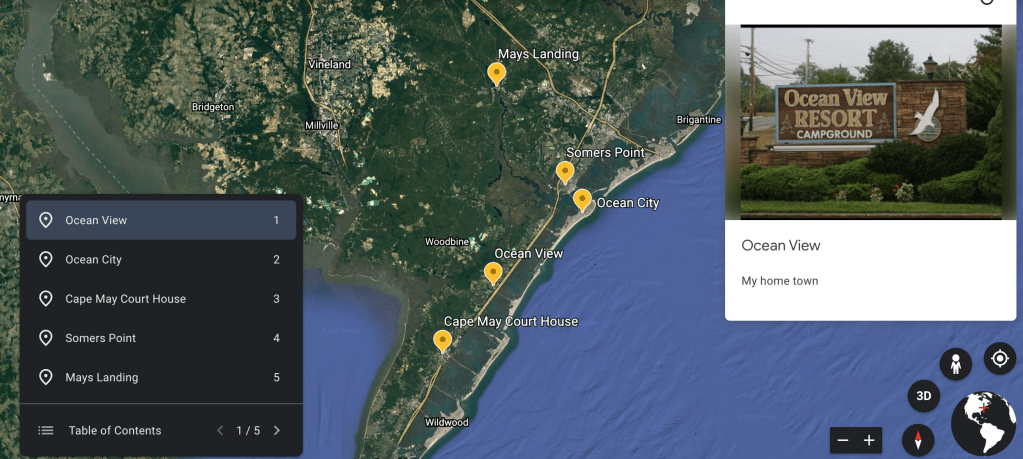
This is my collection of placemarks from Google Earth. I added a different placemark for each location that I included. The first location that I decided to include is Ocean View. This is where I was raised and where I currently live. I also work at a school in this area. The second location that I decided to placemark is Ocean City. This is where I attended high school, worked a few jobs, and currently work at a school. The third place in my project is Cape May Court House. I work at a school there in the summer. The next location that I included is Somers Point. This is where I currently work. The last location that I included in my project is Mays Landing. Mays Landing is where I currently attend school. I added an image to each placemark by getting an image off of Google. To add each placemark, I typed in a location in the searchbar and clicked the button to add the placemark.

Worksheets

Many teachers use worksheets in their classroom as a way to teach and track a student’s progress; but is that really the best thing for the student? Especially at the preschool age, children learn through play. While worksheets can be beneficial, they should not be used too often.

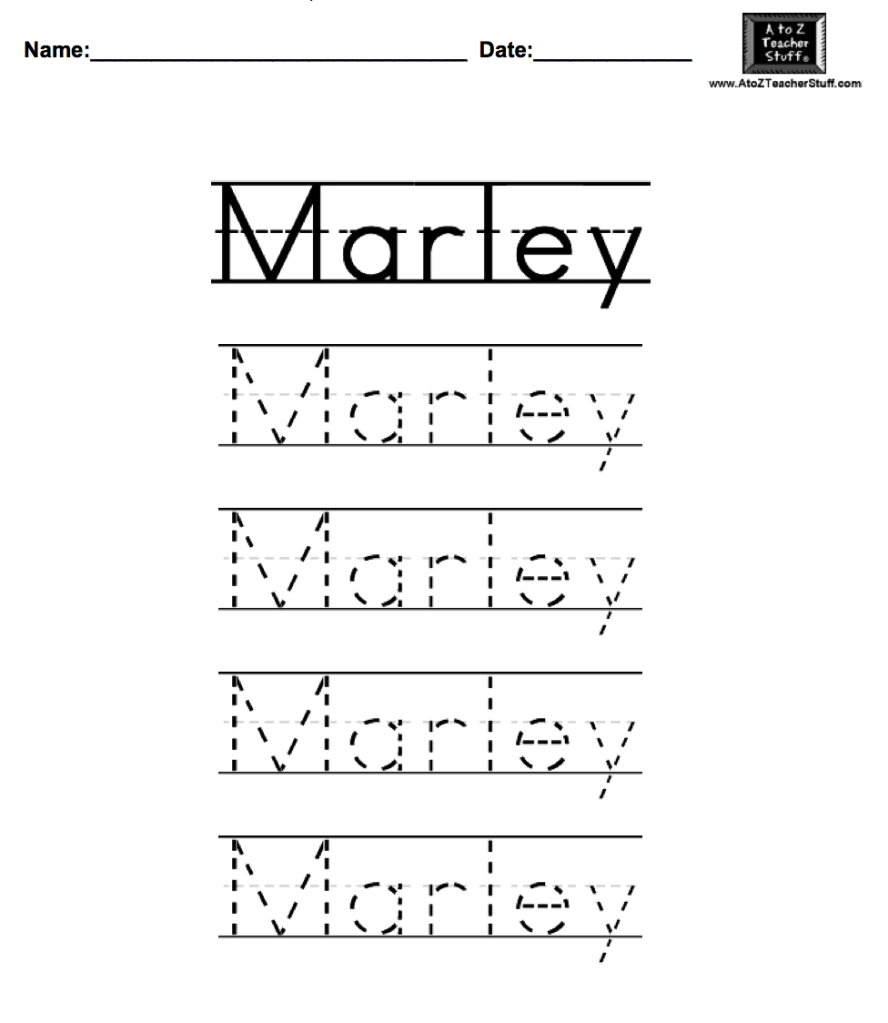
An example of a worksheet is this name handwriting worksheet that I created using the website A to Z Teacher Stuff. This website was easy to use. I can type in any name, number, word, or sentence and it can turn it into one of these worksheets. It also gave the option to add directions at the top of the page. I just typed in a name and selected a font and this website automatically placed it into this worksheet.

Personal Learning Network

A personal learning network (PLN) is a group of people that an educator can connect with to share ideas. Technology makes it easy for teachers to connect and communicate. There is a lot that can be learned from PLNs.

A few professional organizations that are related to early childhood education include:

Zero to Three– This is an organization that is dedicated to ensuring that all babies and toddlers are well cared for. Zero to Three supports the adults who care for these young children in hopes to give the children a bright future.

Pre-K Now– This organization stresses the idea that vital learning occurs before the age of five. They use researched-based approaches to create solutions to today’s problems.

Division for Early Childhood– The Division for Early Childhood supports families of young children who have developmental delays or disabilities. They strive to create an inclusive environment for everyone.

Childcare Aware of America– With a goal to create high-quality, affordable childcare, Childcare Aware of America supports all children and families. They have resource centers located in every state to help families and childcare providers.

Child Education International– This organization is dedicating to helping over 75 nations. They help by providing training, technical assistance, and consultation services to educators around the world.

Besides professional organizations, other websites and blogs can also be helpful to educators. Here are some websites and blogs that share information on incorporating technology into an early childhood classroom:

-“Educator Use of Technology in the Preschool Classroom“- This is a blog that suggests ideas on how to successfully incorporate technology into a preschool classroom. One of their suggestions is to use an app that allows parents and teachers to communicate.

-“The Benefits of Technology in Early Education“- This blog post addresses parents concerns on their child receiving too much media exposure and states the benefits of using technology in the classroom. This blog suggests that deliberate use of technology can benefit a child.

-“Technology Integration in the Preschool Classroom“- This is a blog post that includes research on the inclusion of technology in the classroom. The blog also includes many sites that teachers can use in their preschool classroom.

-“How to Integrate Technology into Your Preschool Classroom“- This website includes ways that technology can be used in a preschool classroom. A few ways that are suggested include through the use of iPads and tablets, interactive whiteboards, and digital storytelling.

-“Preschool Technology: Do’s and Don’ts of Devices in the Classroom“- This blog post lists ways that technology can be used in the classroom as well as ways that technology should not be used in the classroom. The blog suggests that teachers should monitor the use of technology and should not use screen time to replace personal interaction.

Here are a few organizations that offer professional development workshops around the South Jersey area:

-“New Jersey Educational Computing Cooperative (NJECC)“- This organization encourages the use of technology in the classroom. They help teachers in grades from kindergarten through 12th grade. They support an appropriate integration of technology in the classroom.

-“Southern Regional Institute (SRI) and Eduation Technology Training Center (ETTC)“- These organizations offer technology training for educators from preschool to 12th grade. This training is offered at Stockton University. Their goal is to improve student academic performance as well as employee performance.

-“Center for Mathematics, Science, and Computer Education“- This organization offers professional development for educators in grades kindergarten through 12th. Their goal is help science, technology, engineering, and mathematics in the classroom. They offer workshops, mentoring, and coaching.
Visual Learner

I created this concept map using a website called Creately. The website is very easy to use. I started by adding an oval in the middle of the page and expanding from there. The topic I chose was animals. I separated animals based on two groups: land and water. I then listed four animals included in each group. I made each oval a color based on where the word in the oval belongs. For example, animals is in an orange oval because it is the main topic. Then the map breaks down into two groups of animals: the blue ovals. Finally, each of the blue ovals gets broken down into four pink ovals.

Concept maps are good for visual learners. It makes it easy to see the separation of items and topics. It also helps when grouping items.

Webquest Evaluation

One Webquest that I would consider using in my classroom is Endangered Animals. This Webquest is directed toward 3rd and 4th grade students. Students are required to pick one endangered animal and research it. There are questions provided for the students to answer. I like this Webquest because students are not just researching the animals; they are also finding ways to help. I would use this Webquest to teach students about endangered species and the importance of protecting these animals and caring for the environment.

Another Webquest that I would consider using in my classroom is Land Transportation. This Webquest is meant for students in kindergarten through 2nd grade. Students will learn about different types of transportation including cars, trucks, buses, and trains. This Webquest requires students to watch a video and then create a picture of their favorite method of transportation. I like this Webquest because it involves the students creating a craft. I would use this Webquest to teach students about different types of transportation.

Nutrition is another Webquest that I liked. Aimed at 3rd, 4th, and 5th grade students, this Webquest teaches students about healthy snacks. For this Webquest, students must interview other students in their classroom to find out what snacks they eat. After interviewing others, each student will research a snack and find out the nutrition facts. I like this Webquest because it teaches students about what foods they are eating. I would use this Webquest to teach students about healthy eating and to encourage students to be more conscious of their eating habits.

Design a site like this with WordPress.com
Get started